Kanaggawa: A Simple, Elegant Script Font with Bold Swashes
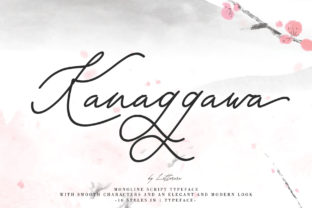
When you need a script font that feels both contemporary and timeless—something that balances refinement with personality—Kanaggawa stands out. It’s not an ornate calligraphy revival or a playful handwritten typeface. Instead, Kanaggawa is a thoughtfully designed script with clean lines, subtle contrast, and expressive bold swashes that add movement without overwhelming your layout. Designers, marketers, and small business owners often reach for it when crafting logos, invitations, social media graphics, or premium product packaging—especially where elegance and quiet confidence matter more than flash.
Why People Choose Kanaggawa (and Why That Choice Can Backfire)
Many users are drawn to Kanaggawa because it looks “effortlessly elegant”—and at first glance, it is. But that initial impression can mask practical pitfalls. For example, some assume its simplicity means it’ll work well across all sizes and contexts. In reality, Kanaggawa’s delicate spacing and pronounced swashes demand thoughtful application. Used too small—or in dense body text—it becomes hard to read. Placed over busy backgrounds or low-contrast images, the fine strokes vanish. And when stretched or distorted to fit layouts, its graceful rhythm collapses.
Another common misstep? Treating Kanaggawa as a “one-size-fits-all” script. Unlike versatile sans-serifs or robust display fonts, Kanaggawa thrives in intentional, limited roles: a headline, a monogram, a tagline. Using it for navigation menus, captions, or multi-line paragraphs dilutes its impact—and risks alienating readers who struggle with legibility.
What You Might Overlook Before Downloading or Buying
Before adding Kanaggawa to your project, check three things—not just whether it “looks nice.”
- Licensing clarity: Kanaggawa is available in multiple versions (free trial, desktop, web, app). If you’re using it in a client logo or SaaS interface, verify the license covers commercial use *and* redistribution. Some free downloads include only personal-use rights—and embedding it in a website without a web font license may violate terms.
- Character set completeness: The standard Kanaggawa family includes Latin characters, basic punctuation, and ligatures—but no extended diacritics, Cyrillic, or Vietnamese support. If your audience includes multilingual users (e.g., French, Spanish, or Vietnamese customers), test how accented characters render—or confirm the foundry offers an expanded version.
- Swash behavior in real software: Kanaggawa’s bold swashes activate via OpenType features (like Stylistic Sets or Swash glyphs). Not all design tools expose these intuitively. In Canva or basic PowerPoint, you’ll get the default letters—no swashes. In Adobe apps, you’ll need to enable them manually via the Glyphs panel or Character panel. Don’t assume they’ll appear automatically.
How Misuse Affects Real Outcomes
Poor implementation doesn’t just look off—it affects usability and perception. Consider a small bakery launching a new seasonal menu. They choose Kanaggawa for the header (“Summer Berries & Brioche”) and apply it across all sections—including ingredient lists and pricing. Because the font lacks true small-text optimization, customers squint at the fine strokes on printed menus or mobile previews. Reviews start mentioning “hard-to-read prices,” and foot traffic dips slightly—not because of the food, but because friction crept into the experience.
Or imagine a freelance designer selecting Kanaggawa for a tech startup’s brand identity. They love its modern flow and use it for the logo, app icon, and presentation slides. But when developers try to implement it on the website, they serve it as a heavy static file instead of optimized web fonts—slowing page load by over 1.2 seconds. That delay increases bounce rate, especially on mobile. The font didn’t fail; the execution did.
Better Ways to Use Kanaggawa—Starting Today
You don’t need advanced typography training to use Kanaggawa well. Start with these grounded, actionable habits:
- Reserve it for high-impact moments. Use Kanaggawa only where attention and tone matter most: a hero headline, a signature line in an email footer, or a boutique product label. Pair it with a neutral, highly legible sans-serif (like Inter, Lato, or even system fonts) for everything else. This contrast makes Kanaggawa shine—not compete.
- Test swashes before finalizing. Don’t rely on preview thumbnails. Open the font in your actual design tool and type common words: “The,” “And,” “With,” “Love.” See which letters trigger swashes—and whether those flourishes enhance or clutter. Disable automatic swashes if they create awkward collisions (e.g., “ff” or “tt” combinations).
- Adjust tracking deliberately. Kanaggawa benefits from slightly increased letter spacing—especially in larger sizes—to let swashes breathe. But don’t overdo it. At 48pt+, try +20–40 units of tracking; at 120pt+, +60–80 may feel right. Always judge by eye, not number alone.
- Export smartly for digital use. If embedding Kanaggawa in a website or app, convert it to WOFF2 format and subset only the characters you need (e.g., uppercase A–Z, numerals, key punctuation). Tools like Transfonter or Font Squirrel’s generator help—many free converters bloat files unnecessarily.
A Final Note on Authenticity
Kanaggawa works best when it reflects intention—not trend. It’s not meant to mimic handwriting, nor does it try to be “fun” or “quirky.” Its strength lies in quiet confidence: a serifless script that feels both crafted and calm. When you choose it, you’re signaling care—not just in aesthetics, but in how your message lands. That means resisting the urge to over-decorate, over-scale, or over-apply. Let it do one thing beautifully, and trust that clarity and restraint will resonate more deeply than visual noise ever could.
If you’ve used Kanaggawa in a way that surprised you—for better or worse—we’d love to hear how context shaped the result. Because great typography isn’t about the font alone. It’s about how thoughtfully it meets the people who see it.