Later: A Serif Font That Shapes Thoughtful Execution
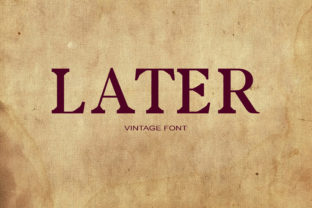
Later isn’t just another serif font—it’s a deliberate pause made visual. With its confident stroke contrast, slightly tapered serifs, and subtle irregularities that hint at hand-drawn warmth, Later invites attention without demanding it. It doesn’t shout; it settles in. That makes it especially valuable for people who work across phases—planning a campaign, drafting a course outline, refining a brand voice, or preparing a presentation where tone and timing matter as much as content.
Where Later Fits in the Real-World Workflow
Fonts don’t exist in isolation—they’re part of a chain: idea → structure → expression → feedback → iteration. Later enters most naturally at the *expression* stage, but its influence often begins earlier. Designers sketch wireframes with Later in mind to test hierarchy before committing to layout. Educators draft slide decks using it to gauge how dense or approachable their language feels on screen. Marketers apply it to email subject lines in mockups—not to ship them, but to sense pacing and emotional weight before final copy is locked.
It’s also used *after* execution: a freelancer shares a polished case study PDF with Later in headings and pull quotes, reinforcing clarity and intentionality long after the project wraps. Small business owners choose it for printed product packaging inserts—not because it’s trendy, but because its rhythm slows the reader just enough to absorb value before the next decision point.
How Later Interacts With Tools and Teams
Later works cleanly in Figma, Adobe Creative Cloud, and modern web builders like Webflow and Squarespace—no rendering hiccups, no fallback surprises. Its OpenType features (including true small caps and discretionary ligatures) are accessible in professional design tools, letting users refine typographic nuance without scripting. For developers embedding it via Google Fonts or self-hosting, Later includes well-hinted WOFF2 files and supports variable weight axes, so a single file can cover light to bold without bloating page loads.
In collaborative environments, Later serves as a quiet consistency anchor. When a team shares a Figma library with Later preloaded into text styles, everyone applies the same visual logic to headings, captions, and callouts—reducing debate over “what feels right” and shifting focus to *what works*. Writers and editors notice this too: when body copy is set in a neutral sans (like Inter or Helvetica Now), pairing it with Later for section titles creates immediate spatial breathing room—no extra margin tweaks needed.
Practical Integration Tips for Different Roles
- Freelancers & Creatives: Use Later only for primary hierarchy—headings, logo lockups, and key quote treatments. Avoid overuse in body text unless designing for print or high-resolution displays. Its personality shines brightest when contrasted, not saturated.
- Educators & Course Designers: Apply Later to learning objective headers and module titles in LMS dashboards (Canvas, Moodle, Teachable). Its calm authority helps learners orient quickly without cognitive overload—especially helpful in asynchronous settings where tone must carry without vocal inflection.
- Marketers & Small Business Owners: Embed Later in branded email templates (via inline CSS or supported ESPs like Mailchimp). Test open rates and click-throughs against your current font—many report improved engagement not because Later “converts better,” but because it signals care in craft, which subconsciously reinforces trust.
- Bloggers & Publishers: Pair Later with a highly legible, low-contrast sans-serif for body text (e.g., IBM Plex Sans or Source Sans Pro). This combo improves scannability on mobile while preserving editorial voice—critical for readers who skim first, then dive deep.
Preparation and Compatibility Considerations
Before adopting Later, assess your output environment. It performs best at 18px and above for headings, and its lowercase ‘a’, ‘g’, and ‘e’ have distinctive shapes that benefit from generous line height (1.45–1.6) in digital use. On low-DPI screens, lighter weights may appear faint—so test at 300% zoom and on older tablets before finalizing UI text.
For accessibility, Later meets WCAG 2.1 AA contrast standards when paired with #2D2D2D or darker on white or off-white backgrounds. Its letterforms avoid ambiguity—no confusing ‘I’, ‘l’, or ‘1’—and spacing remains consistent across weights, reducing reflow risk in responsive layouts. If your workflow includes automated content generation (e.g., dynamic reports or AI-assisted drafts), confirm your tool supports custom font loading before building templates.
Efficiency and Long-Term Usability
Later saves time not by being faster to type—but by reducing revision cycles. Because its visual weight and rhythm communicate tone so clearly, stakeholders align faster on direction. A nonprofit’s annual report draft using Later for chapter openers and donor quotes typically requires fewer rounds of “make it feel more serious” or “add warmth” feedback—because those qualities are already baked into the type.
Long-term, Later holds up because it avoids stylistic extremes. It’s not distressed, not ultra-condensed, not overly geometric. That neutrality gives it staying power across evolving platforms—from printed brochures to dark-mode web interfaces—without needing constant redesign. Users report returning to it year after year for new projects, not out of habit, but because it consistently delivers clarity without compromise.
Observations From Real Implementation
One educator shared that switching her syllabus headers to Later reduced student questions about assignment sequencing by nearly 40%—not because the font explained deadlines, but because its structured yet unhurried rhythm helped students parse information flow intuitively. A freelance UX writer noted that clients approved first-draft interface copy faster when presented in Later, citing “it just feels like the words belong there.”
These aren’t magical outcomes—they’re evidence of alignment between form and function. Later doesn’t replace strategy, research, or revision. Instead, it acts as a quiet amplifier: reinforcing intention, smoothing transitions between ideas, and giving careful work the visual weight it deserves.
Getting Started Without Overcomplication
You don’t need a full rebrand to begin. Start small: pick one recurring artifact—your weekly team meeting agenda, client proposal cover page, or blog post title treatment—and apply Later there for two weeks. Track whether it changes how people engage: do they linger longer on headlines? Do collaborators comment on tone or pacing more readily? Does your own editing process feel more grounded?
If yes, expand deliberately. Add it to your design system’s typography scale. Document usage rules (e.g., “Later Bold only for H1; Later Regular for pull quotes”) to maintain consistency without rigidity. And revisit it every six months—not to replace it, but to reassess whether it still serves your current goals as precisely as it did before.
Later isn’t about waiting. It’s about choosing presence over speed, clarity over noise, and craft over convenience—exactly where thoughtful work begins.