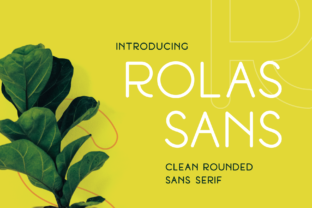
Rolas Sans: A Rounded, Cool Sans Serif
If you’ve ever scrolled through a website, opened an app, or admired a modern poster and thought, “That font feels friendly but confident—clean but not cold,” there’s a good chance you were looking at a rounded sans serif like Rolas Sans. It’s not just another typeface—it’s a thoughtful blend of approachability and polish, designed to feel current without chasing trends.
What Makes Rolas Sans Stand Out?
Rolas Sans is a beautifully rounded sans serif font with a cool feel. Its curves are soft but intentional—not bubbly or childish, not stiff or mechanical. Each letterform has gentle arcs on corners and terminals, giving it subtle warmth while keeping crisp legibility. The x-height is generous, spacing is open, and weight contrast is balanced—so it reads well on screens and in print, from tiny captions to bold headlines.
Unlike many rounded fonts that lean playful or retro, Rolas Sans stays grounded and versatile. It doesn’t shout. It invites. That quiet confidence is why designers reach for it when they want clarity *and* character—without sacrificing professionalism.
Where You’ll Love Using Rolas Sans
Think about the last time you saw a brand that felt both trustworthy and fresh—maybe a wellness studio’s website, a sustainable product’s packaging, or a teacher’s classroom handout. Chances are, a font like Rolas Sans helped shape that impression.
- Digital interfaces: Use it for buttons, navigation menus, and body text in apps or SaaS dashboards. Its readability at small sizes and friendly tone help reduce user friction.
- Social media & marketing: Try it for Instagram carousels, email headers, or ad copy. It adds visual calm amid busy feeds—making your message easier to absorb.
- Educational materials: Teachers and course creators use Rolas Sans in slide decks, worksheets, and digital learning modules because students find it less intimidating than sharp, high-contrast fonts.
- Small business branding: Cafés, boutiques, freelance portfolios, and local service providers choose it for logos, business cards, and signage—it signals care, clarity, and modern simplicity.
A freelance graphic designer recently used Rolas Sans across a client’s rebrand: the logo (in bold), website headings (medium), and even their printed workshop handouts (light). “It unified everything without feeling repetitive,” she shared. “Clients said it ‘felt like us’—warm but capable.”
Why It Fits So Many People—and Projects
You don’t need to be a typography expert to benefit from Rolas Sans. Whether you’re building your first Canva presentation, launching a Shopify store, designing a newsletter in Mailchimp, or sketching a logo idea in Figma, this font works where others struggle.
Beginners appreciate how little tweaking it needs—no awkward kerning fixes or line-height guesswork. Professionals value its consistency across weights and languages (it supports Latin, Greek, and Cyrillic scripts). And because it’s optimized for web use, it loads quickly and renders cleanly on phones, tablets, and desktops.
It also pairs effortlessly with other fonts. Try Rolas Sans for headings with a neutral serif like Merriweather or Lora for body text—or pair it with a clean monospace for code snippets or technical details. Its personality is strong enough to lead, but flexible enough to support.
Things to Keep in Mind Before You Choose
Like any tool, Rolas Sans shines brightest when matched to the right job. Here’s what helps ensure it works well for you:
- Consider your audience’s expectations. If you’re designing for a law firm or financial institution aiming for traditional authority, Rolas Sans may feel too relaxed—unless used sparingly (e.g., only in a friendly call-to-action button).
- Test at real sizes. While it performs well on screen, always preview how it looks at the actual size you’ll use—especially in mobile UIs or small-print footers.
- Check licensing early. Rolas Sans is available in free and premium versions. The free version covers personal and basic commercial use; the full family (with more weights, italics, and extended language support) requires a license for larger-scale or client work.
- Don’t over-round elsewhere. Since Rolas Sans already brings softness, avoid pairing it with overly rounded icons, buttons, or illustrations—balance keeps it feeling intentional, not cutesy.
Real-Life Moments Where Rolas Sans Adds Value
Imagine a yoga instructor creating a monthly newsletter. She uses Rolas Sans for the subject line (“Your Breath, Your Space”) and section headers—its calm rhythm mirrors her teaching style. Her readers pause, click, and stay engaged.
Or picture a student designing a science fair poster. With Rolas Sans for titles and bullet points, complex concepts feel more digestible. Teachers notice the improvement—not just in aesthetics, but in how clearly ideas land.
Even in everyday tools, it makes a difference: a blogger using Rolas Sans in Notion headers creates a reading flow that feels unhurried and human. A café owner chooses it for their online menu—customers linger longer, scanning dishes instead of bouncing away.
Getting Started Is Simple
You don’t need special software to try Rolas Sans. Most design platforms—Canva, Figma, Adobe Express, and even Google Docs (via add-ons)—support it. Start with one weight (Regular or Medium) and one size range. See how it changes the tone of a headline or paragraph. Notice how much friendlier a form label or error message feels when set in Rolas Sans instead of default system fonts.
If you're new to typography, think of Rolas Sans as a reliable collaborator—not something to master, but something to trust. It won’t distract. It won’t confuse. It will simply help your words connect.
At its core, Rolas Sans is more than a font. It’s a quiet way to say, “I care how this feels to read.” And in a world full of noise, that kind of intention matters—whether you're sharing an idea, selling a service, teaching a skill, or simply making something that feels like home.