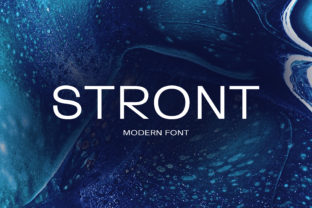
Stront: A Strong, Clean Sans Serif Font Designed for Modern Clarity
When you're choosing a typeface for a brand identity, website, or editorial project, the font does more than spell out words—it shapes perception, guides attention, and silently reinforces your message. Stront stands out in this space not through ornamentation, but through intention: it’s a strong and clean sans serif font with a unique style—balanced, legible, and quietly confident. Its design merges geometric precision with subtle humanist warmth, making it especially effective where clarity, professionalism, and modern sensibility matter most.
Why Font Choice Matters More Than You Think
Many professionals underestimate how much typography influences real-world outcomes. A poorly legible font on a mobile interface can increase bounce rates. An inconsistent or dated type system may unintentionally signal that a brand lacks attention to detail. Designers, marketers, content strategists, and even small business owners often face these challenges:
- Readability fatigue—long-form web copy or documentation that feels exhausting to scan or absorb;
- Brand dilution—using generic system fonts (like Arial or Helvetica) across touchpoints, weakening visual distinction;
- Responsive inconsistency—fonts that render unpredictably across devices or browsers;
- Design-to-development friction—typefaces that lack robust OpenType features, variable weights, or proper hinting for screen use.
These aren’t just aesthetic concerns—they’re usability and credibility issues. That’s where Stront offers a practical solution: a purpose-built sans serif that performs consistently while carrying expressive weight.
How Stront Addresses Real-World Needs
Stront was crafted with functional rigor in mind. Its x-height is generous without sacrificing rhythm; its letterforms avoid extreme contrast or sharp angles, reducing visual strain at smaller sizes and on lower-resolution screens. The result? Text that remains clear, calm, and authoritative—even in dense UIs, legal disclosures, or multi-column layouts.
For example, consider a SaaS company redesigning its dashboard. They need a typeface that supports data density without overwhelming users. With Stront, labels, tooltips, and status indicators retain legibility at 12–14px, while headings scale gracefully up to display sizes—no visual dissonance, no retrofitting required.
Likewise, editorial teams publishing long-form articles benefit from Stront’s balanced spacing and open counters. Characters like “a,” “e,” and “g” are designed for quick recognition, helping readers sustain focus across paragraphs. Unlike ultra-thin or overly condensed alternatives, Stront avoids sacrificing function for trendiness.
Practical Applications Across Roles
Different users engage with typography for different reasons—and Stront adapts accordingly.
Designers & Brand Strategists
You’re building or refining a visual language that must work across print, web, apps, and environmental signage. Stront delivers a full family—light to bold, with matching italics—so hierarchy feels intuitive, not engineered. Its neutral-yet-distinctive character makes it ideal for pairing with expressive serif companions (e.g., a refined text serif for body copy), or standing alone as a cohesive system.
Developers & Product Teams
Implementing Stront is straightforward: it’s optimized for web performance (WOFF2 support, efficient glyph sets) and includes variable font options for dynamic weight and width control. That means fewer HTTP requests, smoother animations, and precise typographic control via CSS—no JavaScript fallbacks needed. It also passes WCAG AA contrast standards when paired with appropriate background colors.
Content Creators & Small Business Owners
If you manage your own website or marketing assets, consistency matters—but time and technical bandwidth don’t. Stront simplifies decisions. Use its Regular weight for body text, SemiBold for subheadings, and Bold for calls to action. That three-tier structure creates instant visual logic—no design degree required. And because it’s available through major font hosting platforms (and self-hostable), integration fits into existing workflows.
Getting Started with Stront: Simple, Strategic Steps
Adopting Stront doesn’t require overhauling your entire design system overnight. Here’s how to begin thoughtfully:
- Evaluate your current pain points. Is readability low in forms or mobile menus? Are headings visually disconnected from body text? Pinpoint where typography actively hinders—not just decorates.
- Test in context—not isolation. Embed Stront into actual UI components (a pricing table, a blog post, an email template). Observe how it behaves with real content, real line lengths, and real user interactions.
- Start with one high-impact area. Replace system fonts in navigation bars or article headlines first. Measure changes in engagement metrics or user feedback before expanding.
- Pair intentionally. Stront works well with understated serifs (e.g., for pull quotes or bylines) or monospaced fonts (for code snippets). Avoid competing sans serifs—its strength lies in its distinct yet restrained voice.
What to Keep in Mind When Using Stront
While Stront excels in clarity and versatility, thoughtful implementation ensures maximum impact:
- Avoid over-styling. Its strength comes from simplicity—skip excessive tracking adjustments, all-caps body text, or heavy letter-spacing unless justified by specific design goals.
- Respect hierarchy. Use weight and size deliberately. Stront’s SemiBold isn’t just “slightly bolder”—it’s a functional tool for signaling importance without shouting.
- Consider language coverage. Verify that the version you license supports all required characters—especially if your audience uses extended Latin, Greek, or Cyrillic scripts.
- Think beyond screens. Print materials, signage, and presentations benefit from Stront’s consistent stroke modulation and generous spacing—just confirm your vendor provides high-res desktop fonts for offline use.
Final Thought: Typography as Quiet Confidence
In a world saturated with visual noise, Stront represents a different kind of power—one rooted in restraint, reliability, and quiet authority. It won’t distract, won’t date quickly, and won’t ask users to work harder to understand your message. Instead, it removes friction. It supports comprehension. It gives your words room to breathe—and your audience reason to stay.
Whether you’re launching a new product, refreshing a legacy site, or simply aiming for more intentional communication, Stront offers more than style. It offers clarity, consistency, and confidence—delivered through every letter, line, and layout.